 Cretli
Remote vibe coding on mobile
Cretli is a self-hosted PWA for remote coding with AI agents — terminal and chat on your phone, talking to your own PC. Plan on one harness, then hand the work to another.
Seven agent harnesses — OpenCode, OpenRouter, Cursor SDK, CodeBuddy, DeepSeek, Qwen Code, Codex. Security notes
Newer than v0.4.0 — the Browser panel, MiMo models, per-harness model favorites, the OpenCode approval advisor, and parallel review fanout are not included in the v0.4.0 release yet.
Harnesses
Works with your harness
Seven pluggable harnesses on one WebSocket protocol — equal citizens, no lock-in. Terminal, files and git need no harness at all.
OpenCode
Drives a local opencode serve — the CLI ships via the optional opencode-ai npm package. Authenticate with Zen or Z.AI, or add a configurable MiMo API key and regional HTTPS Base URL to use Xiaomi MiMo V2.6 Pro and Flash.
OpenRouter
Bring your OpenRouter key for Claude, GPT, or open models — backed by server-side workspace tools.
Cursor SDK
Optional @cursor/sdk with your Cursor API key. Subject to Cursor's terms of service.
CodeBuddy
Optional Tencent agent SDK (@tencent-ai/agent-sdk) plus the CodeBuddy CLI and its own API key.
DeepSeek Harness
Optional DeepSeek Harness — the @deepseek-ai/dsh CLI plus the @deepseek-ai/dsh-sdk-client SDK, with your DeepSeek API key.
Qwen Code
Optional @qwen-code/sdk with a Qwen Cloud API key — pay-as-you-go, Token Plan, or Coding Plan.
Codex
Optional @openai/codex-sdk with the bundled Codex CLI — ChatGPT sign-in or an API key. The picker lists models your plan actually has (Astra when the account has rolled it out).
Settings → Harness shows which backends are installed and ready, and keeps favorite models per harness. The model picker and delegated runs start from those favorites — a harness with empty favorites has no delegation model to pick. Favorites are separate from the chat picker's saved favorite setups. Just here for the terminal? Shell, files, and git work with zero API keys.
Features
Your PC, in your pocket
One small PWA between you and a full development machine — no cloud lock-in, no vendor middleman.
Full shell, files & git
A real terminal session as your user, with file browsing and git — streamed to your phone. Works with no API key at all.
Seven harnesses, zero lock-in
OpenRouter is built in — bring a key and go. OpenCode, Cursor SDK, CodeBuddy, DeepSeek, Qwen Code, and Codex plug in as optional packages. Switch anytime.
Nested chats
Press-and-hold to reorder. Hover ~0.5s to nest a chat, drag among roots to lift it out. Status icons and an attention badge until you mark a finished job reviewed.
Works without keys
Terminal, files, and git need no API key. Bring a key only when you want cloud models.
Your infra, your rules
Runs on your own PC with Node 22.13+ or Docker. Shell, files, and git stay on your machine; cloud-model chats are opt-in with your own key.
Vibe coding, anywhere
Describe the change from the train, the sofa, or the office kitchen — an agent executes it on your machine and reports back, while you watch the terminal live.
Plan & delegate
Plan here. Execute elsewhere.
Approve a plan, then hand it to another harness and model. The planner stays put; the executor runs without a browser tab and reports back on the next turn.
- Build plan → New agent — or type
/execute. Cretli copies the approved plan, starts the executor, and shows a status card on the planner chat. - One implement/fix job at a time — Build plan and fix runs stay exclusive per planner chat, while up to two review jobs can run side by side. Stop stays on Stopping until the run actually ends; retry respects the parent busy lock.
- Plan stays read-oriented — mutating tools are denied before they run on OpenCode, Cursor SDK, Qwen, CodeBuddy, OpenRouter, and DeepSeek. Codex Plan is prompt-only.
- Plans on disk — written to
.cursor/plans/cretli-{chatId}.mdso Build plan has a file to point at.
Plan mode is not a sandbox — keep the localhost default and read Security.
- Nest and reorder — press-and-hold to drag chats and workspace groups. Hover another chat ~0.5s to nest; drag among roots to unnest. Parent is saved on the server; custom order stays in the browser.
- See work without opening the chat — the list polls agent presence. Compact icons for disconnected, connecting, working, and needs-action. Finished jobs keep a badge until Mark as reviewed.
- Pin the desktop sidebar — the drawer sits in the left column instead of overlaying chat. Harness switch from a nested chat keeps the new chat under the same parent.
Screenshots
See it running
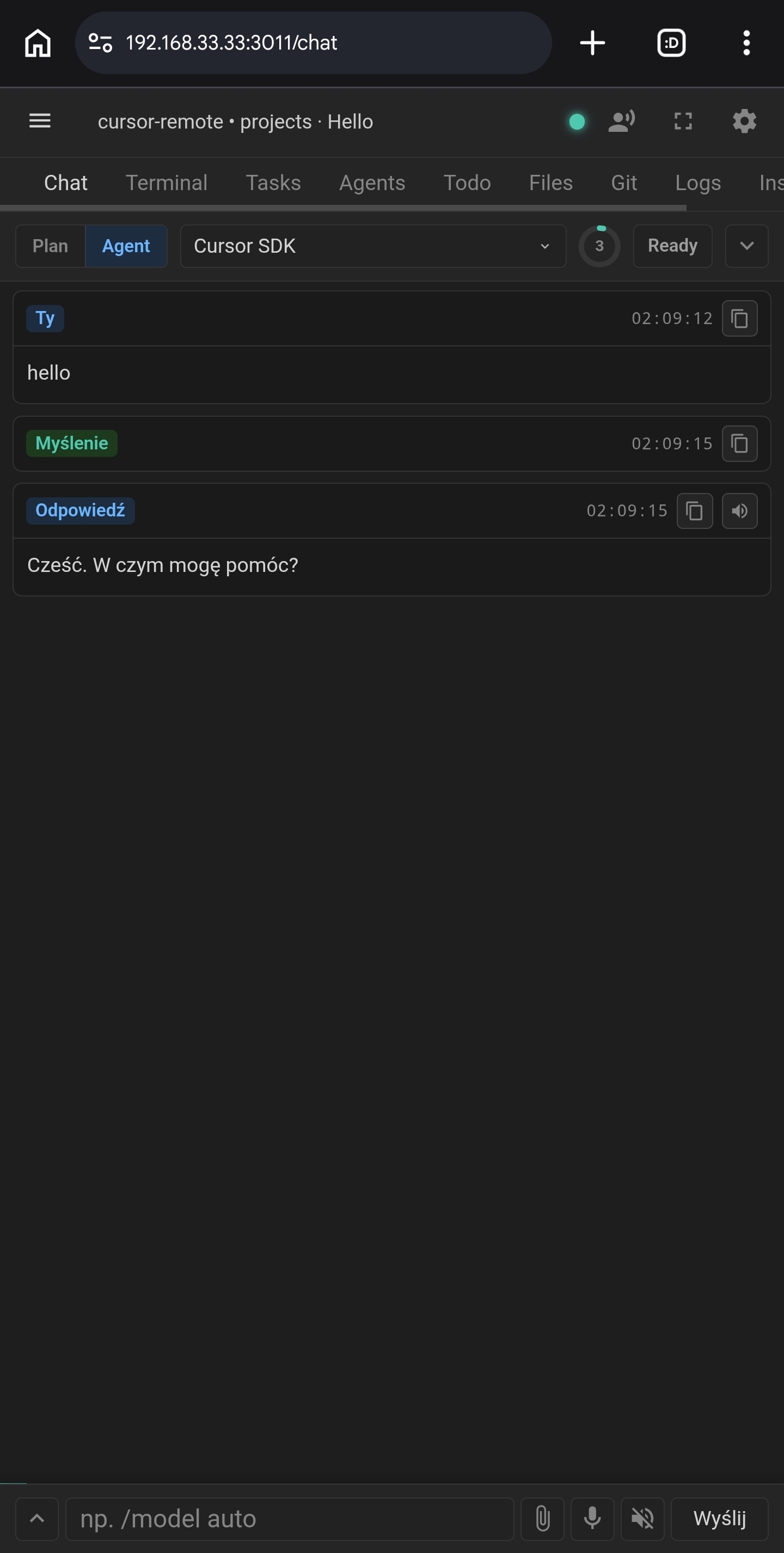
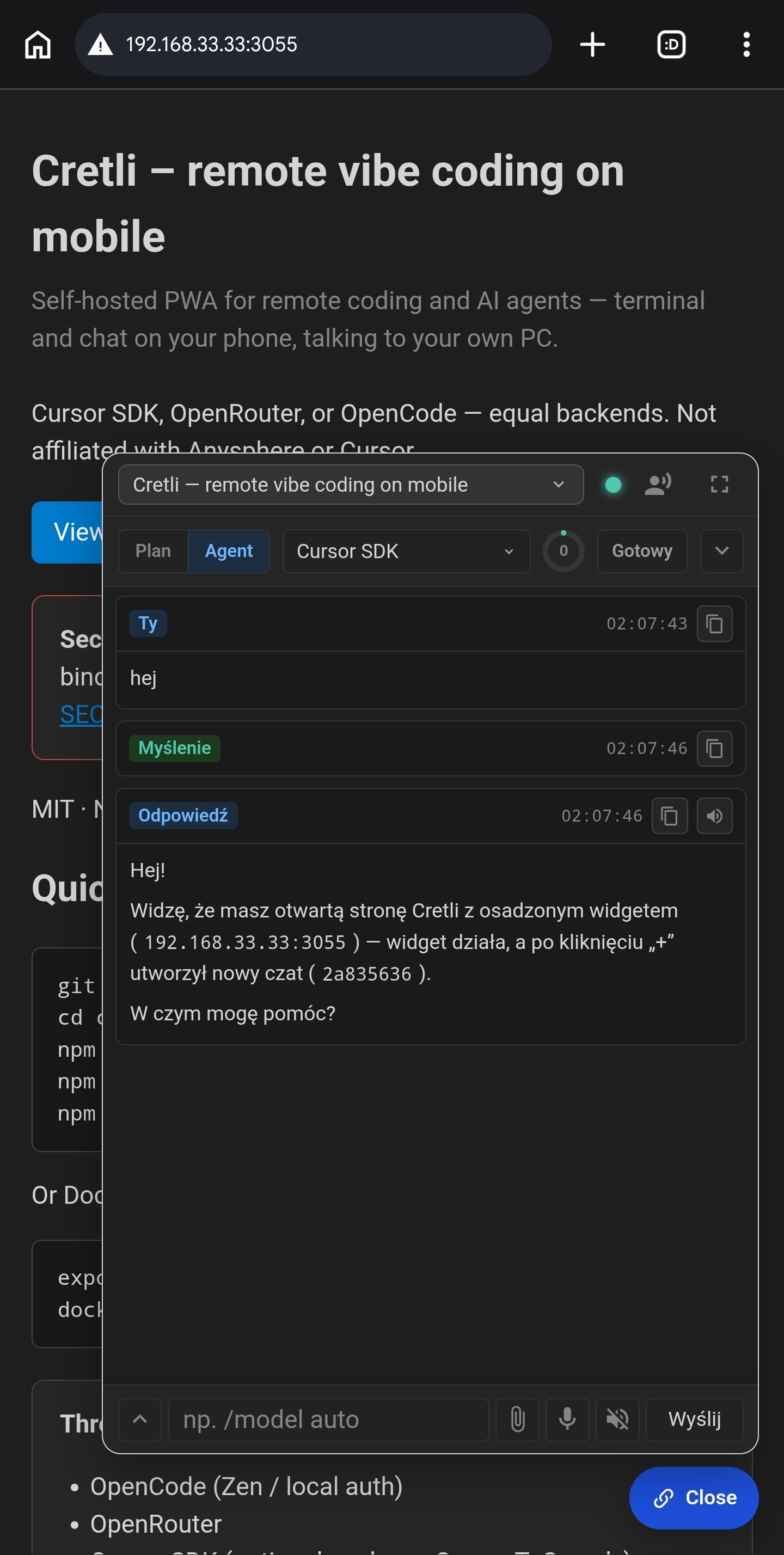
Real screenshots from the current build — the PWA on a phone, and the same agent chat embedded as a widget.
Live session
One session, every screen
Open the same server on a second phone, a tablet, or a laptop — every screen watches the same terminal and chat update in real time.
- Broadcast to every client — one terminal PTY per session, and its output plus the agent chat stream to every device connected at once.
- Join in one scan — the app shows a link and QR code pointing at your LAN URL, so a second screen pairs without typing addresses.
- You own the address — Settings stores the LAN host (
CRETLI_LAN_HOST) that the link and QR point to, so it always matches your network. - No cloud account — screens talk to your server over LAN or VPN, never through a vendor middleman.
Go beyond localhost the way you trust — read Security first.
Voice
Talk it out — hands-free vibe coding
Voice mode is a continuous conversation with your agent, not a voice keyboard.
- Talk continuously — OpenAI Realtime or Gemini Live (the cheapest long conversations), with semantic VAD and noise reduction.
- Your voice steers the app — the agent runs tools as you speak: send prompts, stop the agent, switch chats, run tasks.
- Phones actually play back — Live replies go through a hidden audio element so Chrome on mobile is not silent; Test sound uses the same output.
- Dictate or listen — push-to-talk dictation and read-aloud replies for when you'd rather not talk out loud.
- Guardrails built in — live cost estimate, warning at $2, hard cap at $5, session ends after 90 s of silence.
Microphone access needs HTTPS — npm run gen-cert issues a certificate for your LAN IP (answer the prompt), then open the site on your phone.
Widget
Drop Cretli into any page
Embed the same agent chat on your docs, dashboard, or project page — page context included, any harness.
- One script tag — the widget pairs with your server using an installation ID; no build step.
- Page context, on your terms — the agent sees only what you grant: DOM, console, network, screenshots, even interact and navigate.
- Same chat, any harness — the widget talks to the same backends as the app: OpenCode, Codex, Qwen Code, and the rest.
- New agent on a pinned page — + starts a fresh chat and keeps the send bar, instead of reusing the URL-pinned thread.
Embed snippet
<script
  src="https://your-pc:3011/dist/app/embed-widget.bundle.js"
  data-installation-id="YOUR-ID"></script>
Create the installation in Cretli Settings, paste the snippet, done.
Quick start
Up and running in minutes
Pick npm or Docker — both run the same self-hosted server. From a phone, reach it over your own LAN, VPN, or tunnel (steps in INSTALL.md).
npm
git clone https://github.com/cretli/cretli.git
cd cretli
npm install
npm run build:front:prod
npm start
Docker publishes localhost:3011
export CRETLI_SETUP_TOKEN="$(openssl rand -hex 16)"
docker compose up --build
The setup token authorizes first access. Compose publishes a host-only port, so open it from your phone over LAN, VPN, or a tunnel — see INSTALL.md.
Termux
Your phone can be the server
No PC at hand? Run the whole server inside Termux on an Android phone and code from that very device — or let a tablet or laptop on Wi-Fi join the session.
- Full server on Android — the same npm install plus
npm run start:termux; no desktop, no Docker needed. - Code on the phone itself — open
https://127.0.0.1:3011in the phone's browser; the first run sets your access password. - Or broadcast over Wi-Fi —
npm run start:termux:lanbinds the phone's LAN IP so a tablet or laptop can join the same live session. - Stays awake —
start:termuxholds a CPU wake-lock when Termux:API is installed, so Android doesn't freeze the server in the background. - Android reality — chat works well with an OpenRouter key in Settings; heavy local agents and the Cursor SDK usually aren't available on Termux.
Full walkthrough, update steps, and LAN certificate details: docs/INSTALL.md
Termux on Android
pkg install git nodejs python make clang pkg-config openssl
git clone https://github.com/cretli/cretli.git
cd cretli
npm install
npm rebuild node-pty
npm run build:front:prod
npm run start:termux
Then open https://127.0.0.1:3011 in the phone's browser (Chrome or Firefox) and accept the self-signed certificate.
Browser
A browser panel on a short leash
Drive a headless Chromium beside the chat while every navigation is checked against your workspace policy first.
- Default-deny allowlist — a workspace must explicitly allow each
http(s)://hostbefore Chromium can load it. - Policy-checked navigation — every navigation and subresource redirect hop is re-checked, and credentials are stripped when a redirect crosses origins.
- Separate opt-ins — loopback (
allowLocalhost) and RFC1918/ULA private ranges (allowPrivateNetwork) each need their own explicit allow; neither implies the other. - Cretli's own origin is blocked — the configured public origin and the direct loopback URL stay denied even if allowlisted, so the panel cannot reach the control plane.
- DNS pinning is defense in depth — the default-deny resolver map is not a hard IP-level guarantee. Treat the panel as a convenience, never as a full SSRF or network boundary.
Plan and review delegations get the read-only tool subset, and input needs an explicit confirm. Details in SECURITY.md.
Security
Read this before anything else
⚠ Cretli exposes a full shell as your user
The default bind is localhost. Do not put it on the public internet. If you need remote access, keep it behind a VPN or a tunnel you control.
Cookie-authenticated writes need a CSRF header. Logout closes those WebSockets. Same-host Origin checks include scheme, host, and port. The widget token is required for widget chat — it does not open the terminal. With HTTPS on, missing TLS files stop the server instead of falling back to HTTP.
The OpenCode approval advisor is opt-in and off by default: at most one redacted, HTTPS/DNS-pinned request to an OpenAI-compatible endpoint for a low-risk read, with a daily quota and fail-closed errors. It never approves writes, edits, or network actions automatically.
Full details: SECURITY.md
FAQ
Questions people ask
Can I plan on one model and execute on another?
Yes — that is delegation in v0.4.0. Stay in Plan, then Build plan → New agent (or /execute). Cretli copies the approved plan, runs the executor without a browser tab, and injects the report into the planner's next turn. More in Plan & delegate.
Is Cretli affiliated with Cursor or Anysphere?
No. Cursor SDK is just one of seven equal harnesses (OpenCode, OpenRouter, CodeBuddy, DeepSeek, Qwen Code, and Codex are the others). Using it is optional, and Cursor's terms of service apply to that backend.
Do I need an API key?
Not for terminal, files, or git. A key is only needed for cloud model backends (OpenRouter, Cursor SDK, CodeBuddy, DeepSeek, Qwen Code, Codex). OpenCode also supports Zen / Z.AI auth and an optional MiMo API key with a regional HTTPS Base URL for Xiaomi MiMo V2.6 Pro and Flash.
What do I need to run it?
Your own PC with Node 22.13+ (or Docker), and a phone with a modern browser. Cretli installs as a PWA — no app store involved.
How does my phone reach my PC?
Cretli runs a small server on your machine. By default it binds to localhost, so expose it the way you trust — LAN, VPN, or a private tunnel. Pairing uses a one-time setup token.
Can several devices use it at once?
Yes — multiple devices can share the same session live. Terminal output and chat are broadcast to every connected client, and the app shows a link and QR pointing at your LAN URL so a second screen joins in one scan. More in Live session.
Do I need a PC, or can a phone host it?
Cretli usually runs on your PC (Node 22.13+ or Docker), but the server itself runs fine inside Termux on an Android phone — npm run start:termux, then open the phone's own browser. See Termux for the full steps.
Is it production-ready?
Cretli is early and evolving fast (currently v0.4.0). It exposes a full shell as your user, so treat it as a dev tool for your own machines — keep the localhost default and read SECURITY.md before exposing it anywhere.
Is it really open source?
Yes — MIT licensed, developed in the open at github.com/cretli/cretli. Read the code before you run it; that's the point.
Take your dev machine with you
Self-hosted, open source, and yours. Clone it, run it, vibe from anywhere.